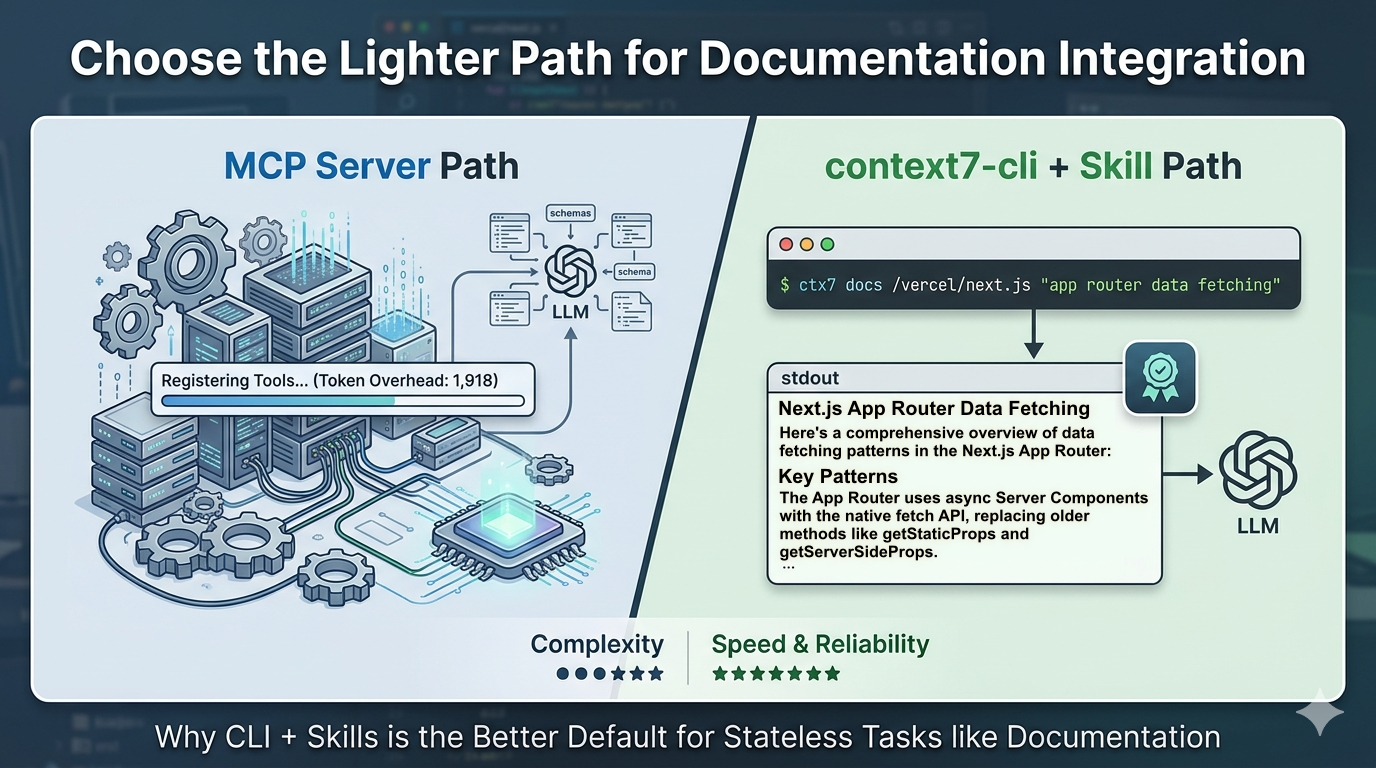
When you first discover Context7, the MCP path is right there in the docs. You know the drill: edit your JSON config, add the server entry, restart, verify the tools show up. It works. And if you’re already running a handful of MCP servers in Claude Code, one more doesn’t feel like a big deal.
But for documentation lookup – which is all Context7 is doing – it’s more machinery than the job requires.
There’s a lighter path: the context7-cli combined with a skill. It does everything the MCP integration does, costs less to run, and is quick to set up. Here’s how it works and why I think it’s the right default for most developers starting with Context7.
How context7-cli Actually Works
The CLI (ctx7) does exactly two things, sequentially.
First, resolve a library name to a canonical ID:
ctx7 library nextjs "app router data fetching"
This searches Context7’s index – over 9,000 libraries – and returns the canonical library ID along with metadata: version identifiers, snippet count, and benchmark scores. The query argument is required; it directly affects result ranking and helps disambiguate when multiple libraries share a similar name. The result is a stable identifier you can pass to the next step.
Second, fetch documentation snippets for a topic:
ctx7 docs /vercel/next.js "app router data fetching"
This pulls current, version-specific documentation snippets relevant to your query and outputs them as plain text to stdout. You can pipe that output anywhere: into a file, into a shell script, into your agent’s context window.
That’s the whole mechanism. No daemon running in the background, no server to configure, no client speaking a protocol. The implementation is 170 lines across two files and has zero npm dependencies. When you call it, it does its job and exits.
And you can use it entirely outside an AI workflow if you want:
ctx7 docs /vercel/next.js "server actions" | pbcopy
Paste it wherever you need it. The tool doesn’t care how you use the output.
What the MCP Server Actually Costs You
The MCP path isn’t broken. But it comes with costs that are easy to overlook.
Setup friction. You need a compatible MCP client, a JSON config file, and a restart to get the tools registered. One-time cost, but real – and it breaks silently when something in the config changes.
Token overhead. Every time Claude Code starts a session, it pre-loads the schemas for every registered MCP tool. The official @upstash/context7-mcp server consumes approximately 1,918 tokens per Claude Code session – before you’ve typed a single message. That’s the server occupying context space whether or not you look up a library today. Even the optimised context7-slim version only brings this down to around 1,262 tokens. The overhead is inherent to how MCP works.
Cost and reliability. A benchmarking comparison of CLI vs MCP tools found CLI tools running at 100% reliability against MCP’s 72% success rate, and coming in 10–32× cheaper per operation. Those aren’t edge-case numbers – that’s the gap at typical usage.
For a stateless lookup task like fetching documentation, you’re paying an ongoing tax for infrastructure that doesn’t add value. The question worth asking is: what is the MCP server doing that a shell command can’t?
The CLI + Skill Combination
Here’s where the pattern comes together. The common objection to CLI tools in an AI workflow is that the agent won’t know when to use them – you have to prompt it explicitly every time. MCP solves this by registering the tool natively. The skill pattern solves the same problem without a server.
Upstash maintains an official context7-cli skill – a SKILL.md file that tells Claude Code exactly when and how to use the CLI. It activates automatically whenever you mention “ctx7” or “context7”, need current docs for a library, or want to install or generate skills. Once installed, the agent calls ctx7 library and ctx7 docs on its own – no explicit prompting required.
Install it with:
ctx7 skills install /upstash/context7 context7-cli
The result: your agent fetches documentation from Context7 automatically. The mechanism is a shell command rather than a protocol call, but from where you’re sitting, the experience is the same. Docs appear in context. Your code is grounded in current library documentation. The agent doesn’t hallucinate APIs.
Skills are also portable. The SKILL.md format follows the Agent Skills standard, so a skill you install for Claude Code works unchanged in Cursor, OpenCode, and other compatible tools. You’re not locked into one editor the way MCP configuration tends to be.
When MCP Is Actually the Right Call
I want to be honest about where MCP wins, because the argument above doesn’t apply everywhere.
MCP is genuinely better for tools that need to hold state across multiple agent calls within a session. The clearest example is the Playwright MCP: when your agent opens a browser, that browser window lives in memory. The agent can make multiple calls that read from or interact with the same window, and the window is tied to the active session – it closes when the agent closes. You can approximate this with a CLI, but it gets awkward fast.
The rule that’s emerged from developer discussions on this: CLI wins when the developer is the user and the task is stateless. MCP’s real advantage is session-scoped, stateful resources.
Documentation lookup is stateless by nature. Each query is independent. Nothing needs to persist between calls. Every call to ctx7 docs is self-contained – it resolves, fetches, and exits. If you’re picking an integration for that kind of tool, you want a CLI.
At a Glance: MCP Server vs. CLI + Skill
| Feature | MCP Server (@upstash/context7-mcp) | CLI + Skill (context7-cli) |
|---|---|---|
| Primary Workflow | Persistent, Editor-Integrated | On-demand, Terminal-Native |
| Startup Cost | ~1,200 – 1,900 tokens (Schema overhead) | ~150 tokens (Skill definition) |
| Architecture | JSON-RPC over stdio or HTTP | Plain text to stdout |
| Statefulness | Stateful: Keeps session data alive | Stateless: Resolve, Fetch, Exit |
| Setup | Edit JSON + Client Restart | Single command: npx ctx7 setup |
| Dependencies | Multiple npm packages | Zero dependencies |
| Best For | Browser automation, DB connections | Documentation, one-off lookups |
Getting Started
Two commands to get the CLI + skill setup running:
# Run setup — choose "CLI + Skills mode" when prompted
npx ctx7 setup
This installs the CLI and drops the skill file into your Claude Code environment. No config file to edit, no server to register.
To use it directly from your terminal:
# Resolve a library (query is required)
ctx7 library react "useEffect cleanup"

# Fetch docs using the returned library ID
ctx7 docs /facebook/react "useEffect cleanup"
Once the skill is installed, you don’t need to run these manually – your agent will call them automatically when it needs library documentation. If you already know a library’s ID, you can skip the resolve step and go straight to ctx7 docs.
The Simpler Path Is the Better One
Context7 solves a real problem: AI coding assistants hallucinate APIs because their training data is stale. Getting current documentation into the context window before the model generates code is the fix.
The MCP server does this. The CLI + skill combination also does this. The difference is what each costs you to maintain.
For documentation lookup – stateless, single-purpose, no shared resources – you don’t need a running server, pre-loaded tool schemas, or protocol-aware configuration. You need a tool that resolves a library name, fetches the right docs, and outputs plain text. That’s ctx7, and a skill is enough to make your agent use it automatically.
Start with the CLI. If you later find yourself needing something stateful and session-scoped, you’ll know when MCP is worth reaching for.